
systeme.io
FREELANCER FINANCE COMMAND CENTER
Built for independent work.
THE FREELANCER’S FINANCIAL OPERATING SYSTEM
Know what you earned. What you owe. What you can keep.
Bring income, expenses, invoices, tax reserves, client profitability, and the next 13 weeks of cash into one clear Excel system—so your weekly money check-in ends with answers.
The work got done. Why are the numbers still unclear?
Reconstructing the month
Friday arrives and every number can be found eventually—but only after checking deposits, receipts, statements, and notes one more time.
Waiting on cash
An impressive revenue total can still include invoices that have not reached your account. The follow-up becomes easy to postpone.
Guessing what is yours
A strong month looks like spending room until tax, renewals, and a quieter stretch are accounted for.
Five disconnected views do not make one clear decision.
Separate invoice lists, bank exports, rough tax estimates, and expense notes show fragments. Every useful question still requires cross-checking several places.
Freelance finance needs a middle layer: detailed enough to connect the important numbers, light enough for a short weekly routine, and visual enough to show what deserves attention.
The value is not another sheet to fill in. It is having revenue, costs, receivables, tax planning, client value, and forward cash visibility respond to the same records.
Your business, visible from one command center
Enter the records you already manage. The connected dashboard turns them into a weekly operating view you can scan before deciding what needs attention.
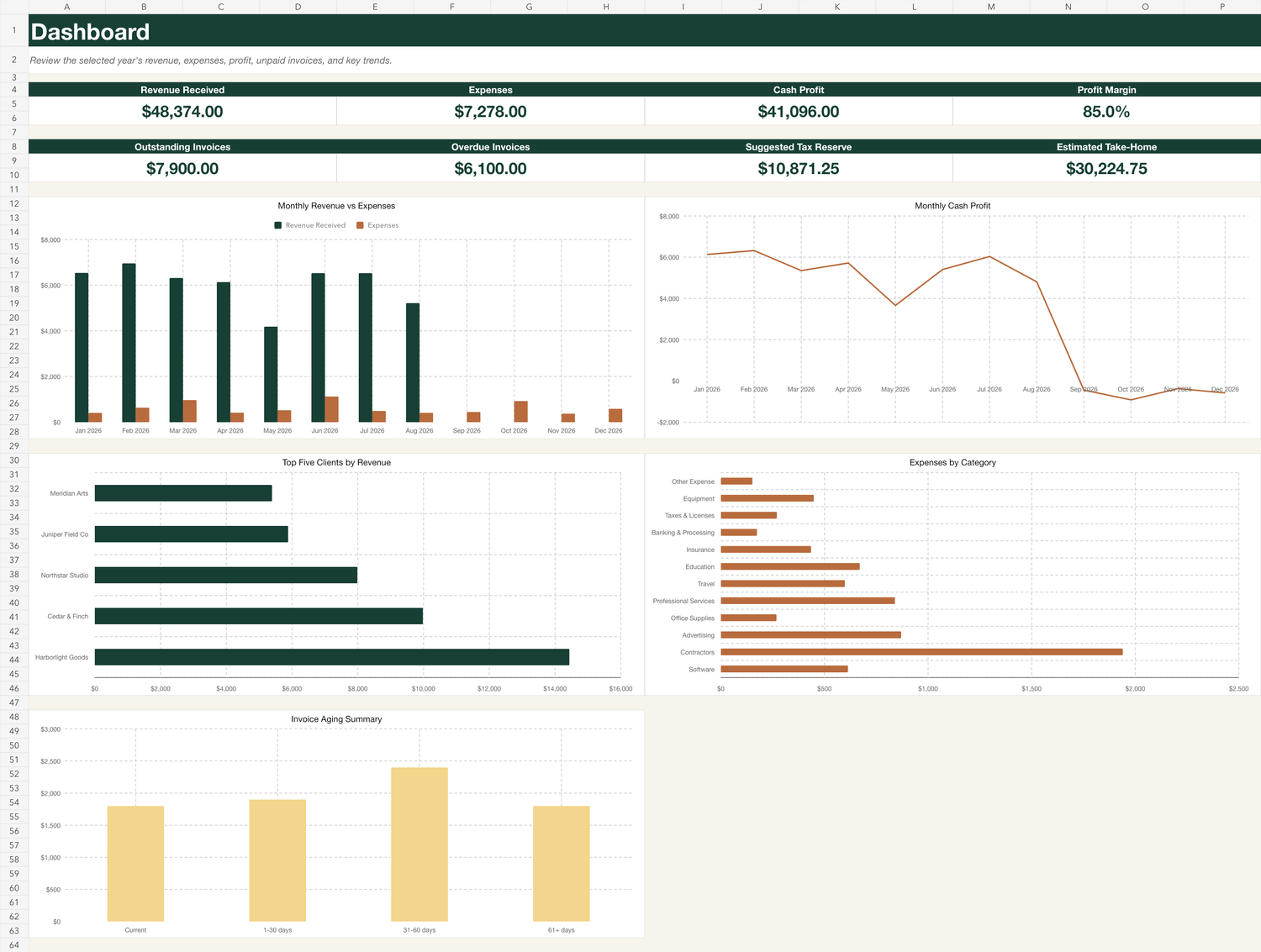
Start with the whole picture
Review revenue received, expenses, cash profit, profit margin, outstanding invoices, overdue invoices, suggested tax reserve, and estimated take-home together.
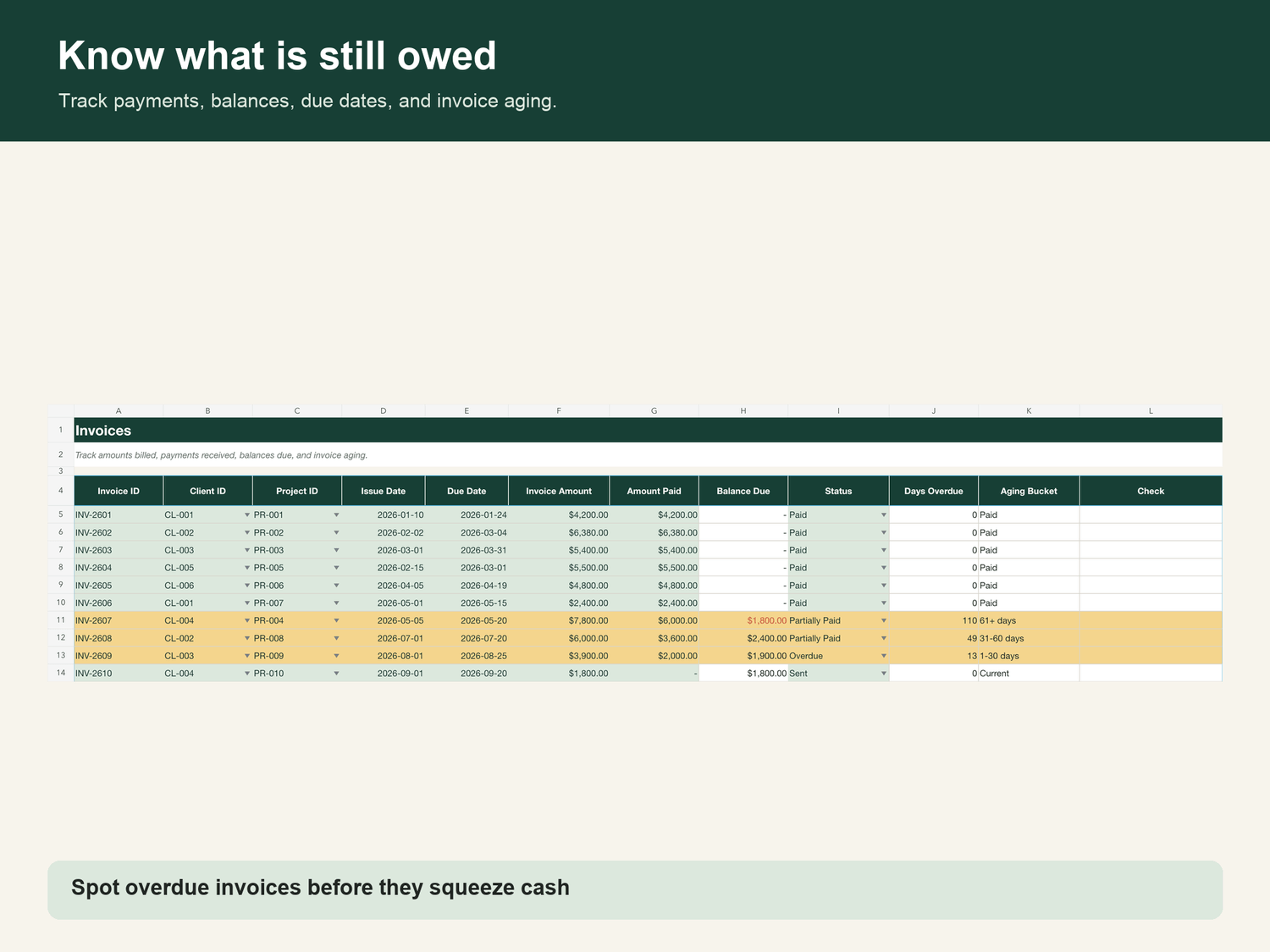
See the invoices that need a conversation
Track client, due date, payment status, and aging so an unpaid invoice does not disappear inside a monthly total.
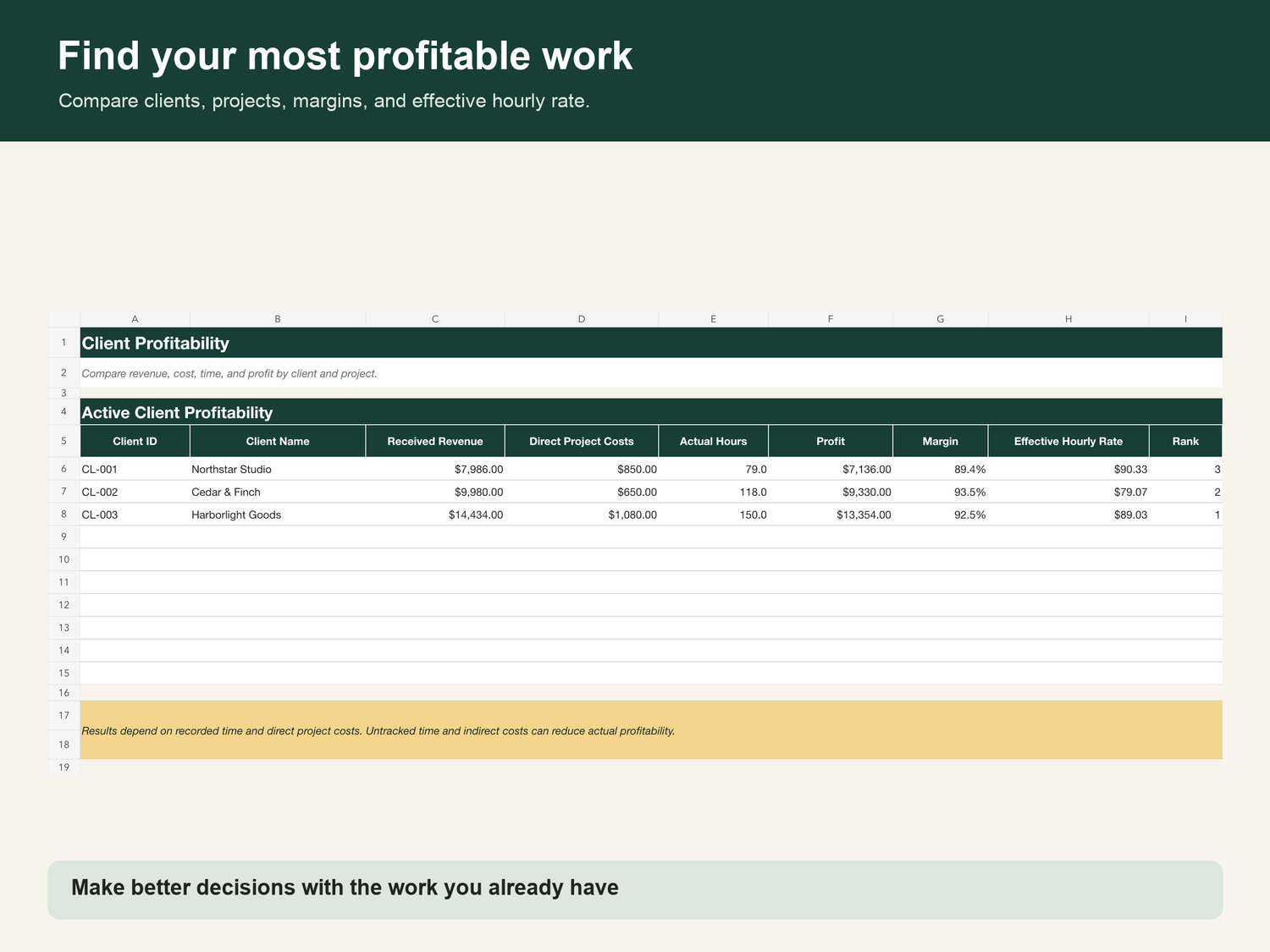
Know which client work pays
Compare revenue and related costs by client so pricing and workload decisions rely on more than instinct.
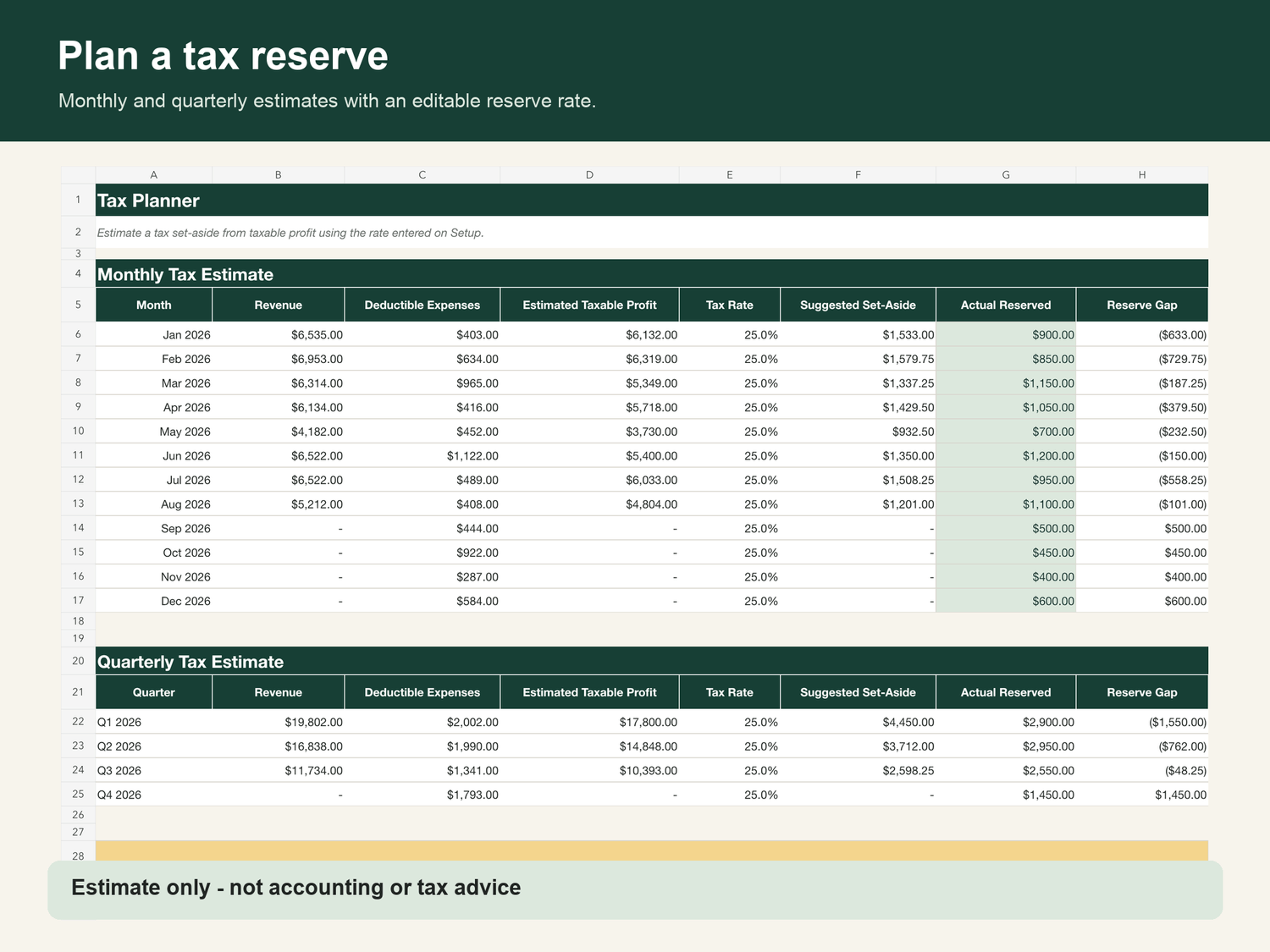
Separate usable cash from future obligations
Estimate the amount to reserve for tax and the amount that may remain available after that reserve. These are planning estimates, not tax advice.
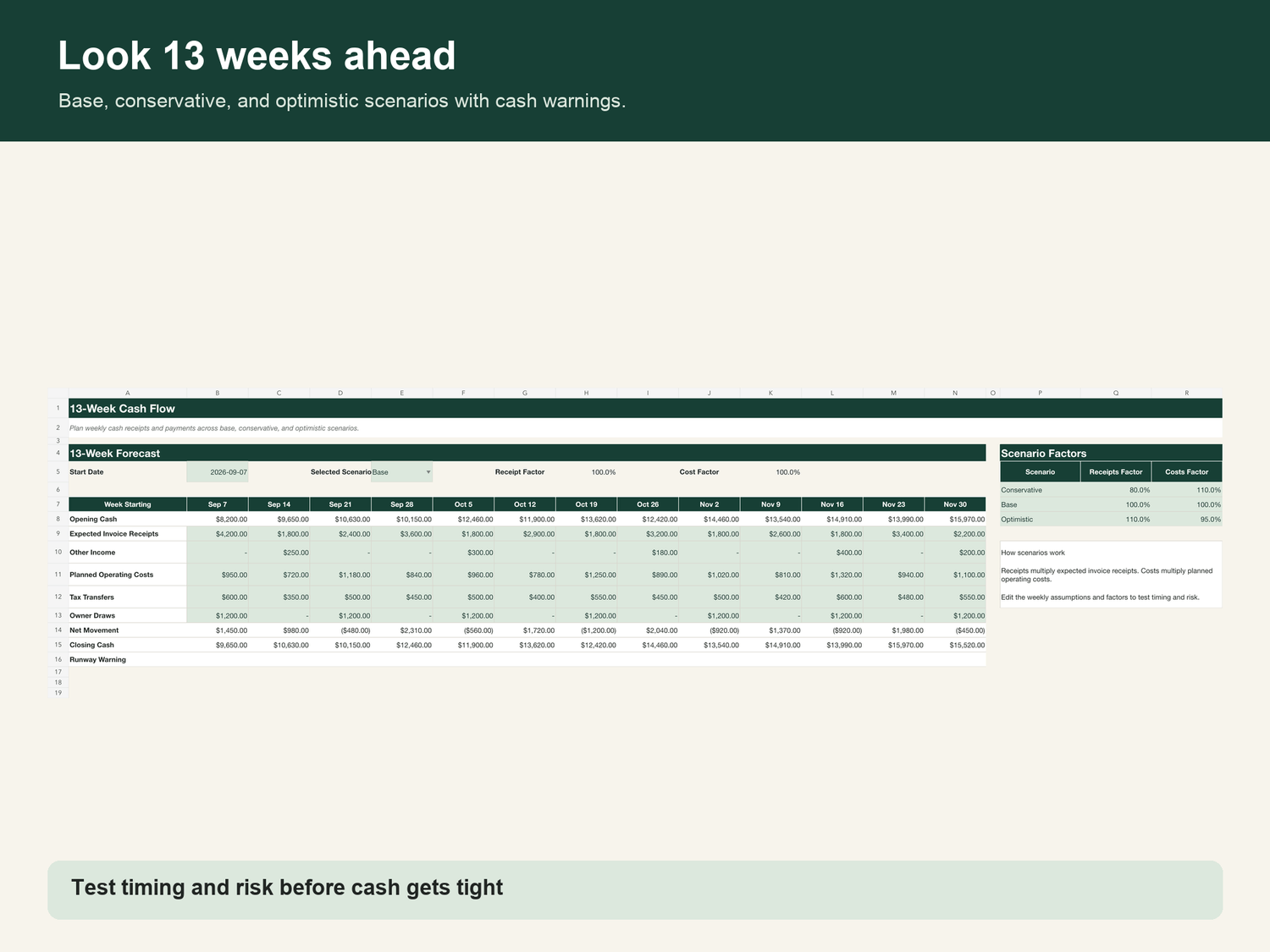
See a low-cash week before it arrives
Look ahead across 13 weeks of expected money in and out, giving you time to follow up, move an expense, or reconsider timing.
A 15-minute rhythm you can repeat every Friday
01
Update the records.
Add new income, expenses, invoices, and payments from the week.
02
Review the exceptions.
Check overdue invoices, tax reserve, client profitability, and low-cash weeks.
03
Choose the next move.
Follow up, reserve cash, adjust timing, or close the workbook knowing where things stand.
Built around the reasons spreadsheets usually get abandoned
“I am not good with spreadsheets.”
You do not build formulas, charts, or dashboards. Start with the filled demonstration file, follow the plain-English guide, and enter information into clearly labeled tables.
“I will not maintain another complicated system.”
The workflow is one short weekly sequence: add recent records, update invoice status, then review the dashboard, tax planner, and cash forecast.
“I already track some of this elsewhere.”
Keep the tools that send invoices or process payments. The Command Center becomes the decision layer that brings their key outcomes into one view.
The practical questions
A current desktop version of Microsoft Excel provides the intended experience. Compatible spreadsheet applications may display formulas, charts, formatting, or controls differently.
You receive the clean command-center workbook, a completed demonstration workbook, the Start Here PDF, and a personal-use license in one ZIP package.
The personal-use license covers your own freelance operations. It does not permit resale, sharing, redistribution, or using the workbook as a client deliverable.
No. It is an organizational and planning workbook, not accounting, legal, or tax advice. Confirm tax rates, classifications, and financial decisions with a qualified professional when appropriate.
The workbook is downloaded to your device. You control where you save it and what business information you enter.
One payment. The complete system.
US$17 once.
No recurring subscription.
- Clean workbook — gives your real records one organized home
- Completed demo — shows the intended workflow before setup
- Start Here guide — explains setup and the weekly review
- Personal-use license — makes permitted use clear
After checkout, the order-confirmation page displays your ZIP download. Save it, unzip the folder, read Start_Here.pdf, inspect the demonstration workbook, and make a working copy before entering real financial information.
14 days to verify the delivery
If the files are inaccessible, corrupt, duplicated, or materially different from this description, contact support within 14 days and the issue will be corrected or your purchase refunded. Your statutory consumer rights remain unaffected.
Give Friday’s numbers one clear answer.
Stop rebuilding your financial picture every time you need it. Put the records you already manage into one connected weekly system.
© 2026 DotCom Road · Freelancer Finance Command Center
Personal-use digital product. This workbook is not financial, accounting, legal, or tax advice.